Tuesday, December 19, 2017

Raspberry PI - Program a Blinking LED


  1. Connect your LED's cathode (short leg) to a 0V or Ground pin of the Raspberry PI. 
  2. Again connect your LED's Anode (Long Leg) to a GPIO pin via a resistor around 150 ohms (Resistor will save your LED from burnings due to high voltages). Here we use GPIO 8 to be connected to the Anode.
  3. Write the following code.

  4. #include <wiringPi.h> //import the wiringPi lib
    #include <stdio.h>

    #define LedPin 8  //GPIO index which will be connected to the LED's Anode

    int main(void) {
    //Initializing the wiringPi
           if(wiringPiSetup() == -1) {
                   printf("setup wiringPi failed !\n");
                   return -1;
           }
                                    
                                    //Set the PIN mode as output
           pinMode(LedPin, OUTPUT);

           while(1) {
                   digitalWrite(LedPin, LOW);   //led on
                   printf("led on\n");
                   delay(1000);                 // wait 1 sec
                   digitalWrite(LedPin, HIGH);  //led off
                   printf("led off\n");
                   delay(1000);                 // wait 1 sec
           }
           return 0;

    }


  5. Save above code as blinking_led.c then compile and run as below.
  • gcc blinking_led.c -o blinking_led -lwiringPi
  • ./blinking_led


Raspberry PI - How to program with C

To program Raspberry PI with C, we are going to use a library called WiringPi .

Access to your Raspberry PI via SSH and configure the WiringPi as below.

  1. git clone git://git.drogon.net/wiringPi
  2. cd wiringPi
  3. ./build


WiringPi has its own PIN numbering system and we need to refer to that numbering system when doing programming.

Thursday, June 22, 2017

How to include a RSForm to a page built with ST Page Builder in Joomla 3

We can include a RSForm to a page built with ST page builder without using RSForm's "Content Plugin for Joomla 3.0". (Currently "Content Plugin for Joomla 3.0" is not freely available)

Main steps for this are :

1. Create a RSForm using the RSForm! Pro component
2. Create a new module including that component
3. Include the module to a page built using the ST Page Builder component

1.1) Create a RSForm


2.1) Create a new Module


2.2) Choose the module type


2.3) Include the required RSForm to the module (Set required position, Access, Ordering, Language, Menu Assignment etc)


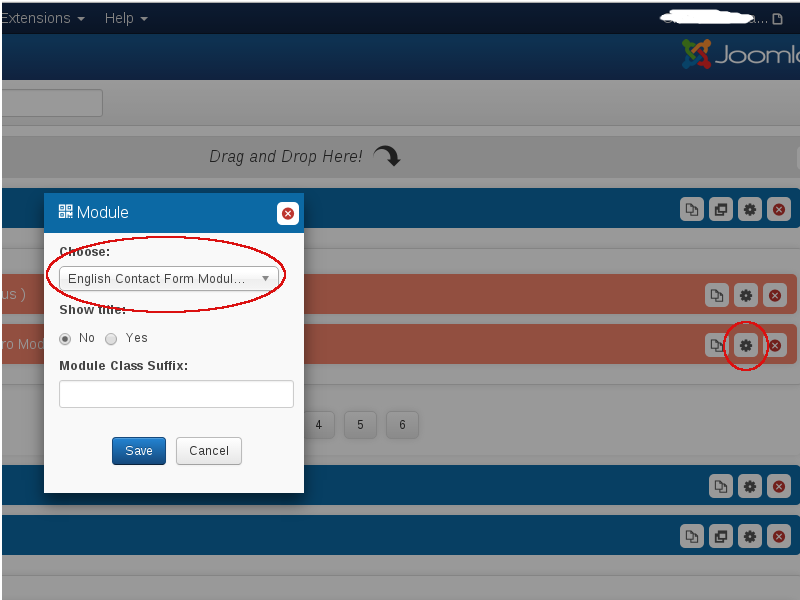
3.1) Go to the page built with ST Page builder
3.2) Drag the "Module" tool from the tool box and drop it on design where necessary


3.3) Click on the "Edit" button and choose the necessary module we created.


Now Form should be visible inside the page.

Monday, June 5, 2017

How to start & stop a VPN connection via shell

To list all available Network Manager connections:-
nmcli con

To start an available VPN connection:-
nmcli con up id ConnectionName

To stop an available VPN connection:-
nmcli con down id ConnectionName

Thursday, March 16, 2017

Print a web page with CSS styles

Assume you have created a web page with several CSS styles including several colours in it. However, when you try to print that web page through a web browser you might not see the included styles in the web pages's print preview.

To make available your styles to the page's print version, you have to import your print style sheet to your web page as follows.

print_style.css


.title{
color:blue
}


print_page.html


<html>
<head>
<!-- If you use media="screen" styles will be only available on the screen-->
<link rel="stylesheet" href="print_style.css" type="text/css" media="print" />
</head>

<body>

<h1 class="title">I am blue</h1>
</body>

</html>


As you can see in the above print_page.html we have linked our style sheet using attribute media with value print.


Now you can see styles available in the print_style.css in the print preview but not in screen. You can use media="screen" to display styles on the screen but not in print.

Monday, January 16, 2017

Frequently used tcpdump commands

* View available network interfaces
tcpdump -D

* Capture and prints only 10 packets from a single available interface:
tcpdump -i [any_available_interface] -c 10

* Capture and prints packets from a single available interface and display more contents inside packets.
tcpdump -l -v -i [any_available_interface]

* Capture packets and grep for a specific word.
tcpdump -l -v -i [any_available_interface] | grep [any_possible_available_word]

* Capture and prints packet details including header values in ASCII and HEX
tcpdump -l -v -X -i [any_available_interface]

* Capture and prints tcp packets from specific_src_IP:port 80 to specific_dst_IP
tcpdump -l -i [any_available_interface] port 80 and dst [any_available_IP] and src [any_available_IP] and tcp

* Capture packets from specified host and write those packets to a file.
tcpdump -w /file/path.pcap -l -i lo host [any_available_IP]

* Read and filter the packets through port 80 from above saved file and print details.
tcpdump -r /file/path.pcap -l -v port 80

Friday, January 13, 2017

Useful REGEXs

^ - says start matching from the beginning of the string.
\d - says match only digits
+ - says match minimum 1 or more occurrences
* - says match minimum 0 or more occurrences
$ - says matching happens until the end of the string.


^\d+$ - Numeric Only

^\D+$ - Characters only


^true$|^false$ - True or False only

^\d+(,\d+)*$ - Comma separated digits only (1,2,3,5)

^\d+(:\d+)$ - Two digits separated by Colon (10:00)

^(\d+(:\d+)(-\d+(:\d+)))$ - Two groups of Two digits separated by colon, connected by a dash (8:00-10:00)


Wednesday, November 23, 2016

How to connect to HSQL DB via console

I was using Spring boot(1.4.0.RELEASE)  with HSQL DB(hsqldb-2.2.6) for one of my projects. For one of my purpose, I needed to log to my HSQL DB via console and execute queries manually. After few searchings, I found a specific tool called sqltool(sqltool-2.2.6) which can be used for that purpose.

  1. Download  sqltool(sqltool-2.2.6) via http://www.hsqldb.org/repos/org/hsqldb/sqltool/2.2.6/
  2. Place the sqltool-2.2.6.jar in the same location where hsqldb-2.2.6.jar is available.
  3. Run the sqltool jar using following command.

  4. java -jar <path_to_sql_tool_jar>/sqltool-2.2.6.jar --inlineRc=url=jdbc:hsqldb:file:<path_to_db_where_.log_.propertis_.script>/<db_name>,user=<db_user_name>

  5. Then password will be asked. After authentication, you will log to console.
  6. Remember to close all the other connections to the particular DB otherwise, Database lock acquisition failure will be occured.

Sunday, October 16, 2016

ActiveMQ Message Attribute definitions

[Details are collected from several online references to ActiveMQ documentation, StackOverflow, blogs, mailing lists etc. Expecting expert comments or reviews regarding this post since it was difficult to find a direct trustful resource related to this topic.]

Property
Description
Delivery Mode
Delivery mode can be either persistent(integer value 2) or nonpersistent(integer value 1).
ID
An Unique ID for the message. Automatically assigned when the message is received to JMS server.
Priority
A priority level for each message. Priority range is 0-9. 0 is the lowest priority and 9 is highest.
Re-Delivery
Value is a boolean. If the true message will be considered for redelivery. If the false message will not be considered for redelivery.
Timestamp
for the time when the message is received by the JMS server.

ActiveMQ Queue Attribute definitions

[Details are collected from several online references to ActiveMQ documentation, StackOverflow, blogs, mailing lists etc. Expecting expert comments or reviews regarding this post since it was difficult to find a direct trustful resource related to this topic.]

Property
Description
Size
Available messages in the queue or topic.
Producer Count
Number of producers for the particular destination.
Average Enqueue Time
On average, the amount of time (ms) that messages
remained enqueued.
Average Message Size
Average message size in bytes related to the specific queue.
Broker ID
ID of the JMS broker which the particular queue/topic is own by
Broker Name
Name of the JMS broker which the particular queue/topic is own by
Consumer Count
Number of consumers for the particular destination.
Dequeue Count
Total number of messages removed from a queue and committed. This value reset on the JMS startup.
Destination Name
Name of the particular queue or topic.
Dispatch Count
Dequeue count + Inflight Count
Enqueue Count
Total number of messages sent to a queue and committed. This value reset on the JMS startup.
Expired Count
The total number of messages in the queue that were not delivered since they are expired.
Inflight Count
Total number of messages sent from the queue to consumers but not committed.
Max Enqueue Time
The maximum amount of time(ms) that messages remain enqueued.
Memory Limit
Memory limit, in bytes, used for holding undelivered messages before paging to temporary storage.
Memory Percent Usage
Percent of memory limit used.
Memory Usage
Total memory usage for available messages in the queue. Value is in Bytes.
Messages Cached
Number of messages in cache. [Need to verify]
Min Enqueue Time
The minimum amount of time(ms) that messages remain enqueued.

ActiveMQ Broker Attribute definitions

[Details are collected from several online references to ActiveMQ documentation, StackOverflow, blogs, mailing lists etc. Expecting expert comments or reviews regarding this post since it was difficult to find a direct trustful resource related to this topic.]

Property
Description
Average Enqueue Time
On average, the amount of time (ms) that messages
remained enqueued.
Average Message Size
Average message size in bytes related to all the destinations in the broker.
Broker ID
An unique ID for the JMS broker. Automatically assigned in the startup.
Broker Name
A name for the JMS broker. This can be configured when the Broker is initialized. If not configured a default value will be assigned eg: localhost
Consumer Count
Total number of consumers related to all available destinations of the JMS broker.
Data Directory
ActiveMQ DB file store location.
Dequeue Count
Total Number of messages removed and committed from all the available queues of the JMS broker. This value resets on the JMS startup.
Dispatch Count
Dequeue Count + Inflight Count
Enqueue Count
Total Numbers of messages sent to all available queues and committed. This value resets on the JMS startup.
Expired Count
Total number of undelivered messages in all of the queues due to message expiration.
Inflight Count
Total number of messages sent from all the queues available in JMS broker to consumers but not committed.
Max Enqueue Time
The maximum amount of time(ms) that messages remain enqueued.
Memory Limit
Memory limit, in bytes, used for holding undelivered messages before paging to temporary storage.
Memory Percent Usage
Percentage of memory allocated for the broker to keep track of destinations, cache messages etc.
Memory Usage
Amount of memory available for the broker from the JVM memory
Messages Cached
Number of messages in the cache. [Need to verify]
Min Enqueue Time
The minimum amount of time(ms) that messages remain enqueued.
OpenWire
If OpenWire transportconnector is defined in activemq.xml, connection URL for that transport.
Size
Total available message count of all destinations in the JMS broker.
Producer Count
Total number of producers related to all available destinations of the JMS broker.
SSL

Stomp
If Stomp transportconnector is defined in activemq.xml, connection URL for that transport.
Stomp+ssl
If Stomp over SSL transportconnector is defined in activemq.xml, connection URL for that transport.
Store Limit
Assigned disk space to store persistent messages.
Store Percent Usage
Percentage of the assigned disk space that has been used up to store persistent messages.
Store Usage
Disk space used by the persistence messages.
Temp Limit
Assigned disk storage to spool non-persistent messages.
Temp Percent Usage
Percentage of the assigned disk storage that has been used up to spool non-persistent messages.
Temp Usage
Disk space used by the non-persistent messages.
VM
Connection URL for VM transportconnector.

Monday, September 12, 2016

Apache camel routing to return the Exact HTTP error code

Let's say we need an apache camel routing configuration which acts as a HTTP proxy. It does only hand over the message to an external system which is given to the ESB by another external system. No any message modification happens in the ESB.

System A >>>>> ESB >>>>> System B

Let's take an example.

System A sends a request to the ESB without required Authorization header. ESB just forewards that message to the System B. So, System B returns a 401(Unauthorized) status code to the ESB. According to the default behavior ESB returns HTTP 500 back to the System A which we don't like to expect from a proxy setup. We need exactly what System B has sent to ESB. To achieve that behavior from ESB, we can apply following routing configuration.

<route>
            <from
                uri="jetty:http://{{xxx.esb.host}}:{{xxx.esb.port}}/?matchOnUriPrefix=true" />
            <setHeader headerName="CamelHttpMethod">
                <simple>${headers.CamelHttpMethod}</simple>
            </setHeader>
            <setHeader headerName="RestEndpointURL">
                <simple>
                    http://{{xxx.rest.endpoint.host}}:{{cgx.rest.endpoint.port}}${headers.CamelHttpUri}?bridgeEndpoint=true
                </simple>
            </setHeader>
            <setHeader headerName="Exchange.HTTP_PATH">
                <constant></constant>
            </setHeader>
            <recipientList>
                <simple>${headers.RestEndpointURL}</simple>
            </recipientList>

            <onException>
                <exception>java.lang.Exception</exception>
                <handled>
                    <simple> true </simple>
                </handled>
                <setHeader headerName="Exchange.HTTP_RESPONSE_CODE">
                    <simple>${exception.statusCode}</simple>
                </setHeader>
            </onException>


        </route> 

Thursday, August 25, 2016

Excetion: waiting for namespace handlers [http://camel.apache.org/schema/cxf

2016-08-26 09:19:06,451 | INFO  | -7.0.0.M2/deploy | BlueprintContainerImpl           | 28 - org.apache.aries.blueprint.core - 1.6.1 | Bundle com.xxxx.yyyyyyy.esb/0.0.1.SNAPSHOT is waiting for namespace handlers [http://camel.apache.org/schema/cxf]

When I was developing an Apache Camel REST project using CXFRS with the blueprint schema in XML DSL, above INFO log was appeared and bundle went to a Grace period. When the issue occurred my xml namespace configurations as below.

<?xml version="1.0" encoding="UTF-8"?>

<blueprint xmlns="http://www.osgi.org/xmlns/blueprint/v1.0.0"
 xmlns:xsi="http://www.w3.org/2001/XMLSchema-instance" xmlns:util="http://www.springframework.org/schema/util xmlns:cxf="http://camel.apache.org/schema/cxf"     

xsi:schemaLocation=" 
http://www.osgi.org/xmlns/blueprint/v1.0.0 https://www.osgi.org/xmlns/blueprint/v1.0.0/blueprint.xsd 
http://camel.apache.org/schema/cxf http://camel.apache.org/schema/cxf/camel-cxf.xsd"> 

I verified several times for the existence of the camel-cxf.xsd in the schemas of the camel-cxf dependency.

And also verified servicemix container contains the camel-cxf feature installed.

Finally I understood name-spaces and XSD locations should be as follows since I am using the blueprint schema.

xmlns:cxf="http://camel.apache.org/schema/bluprint/cxf" 

http://camel.apache.org/schema/blueprint/cxf http://camel.apache.org/schema/blueprint/cxf/camel-cxf.xsd

Then issue resolved.